Membership Benefits
Module Overview
The Benefits module helps you manage membership plans, view resource usage, recharge Tokens, and redeem points. The platform offers two membership systems — Individual and Team — with unified control over membership permissions, computing quotas, and subscription payments.
Core Universal Rule: Tokens are used for all AI-powered features including literature interpretation, research exploration, and scientific drawing. Tokens granted by plans, recharges, and point redemptions never expire, and plan expiration does not affect your existing Token balance.
Access
In Personal Space, click the "My Benefits" button to enter the individual benefits page; in Team Space, click the "Team Benefits" button to enter the team benefits page.
Eligible Roles
All users can purchase individual or team membership benefits as needed.
Individual Benefits (Personal Space Exclusive)
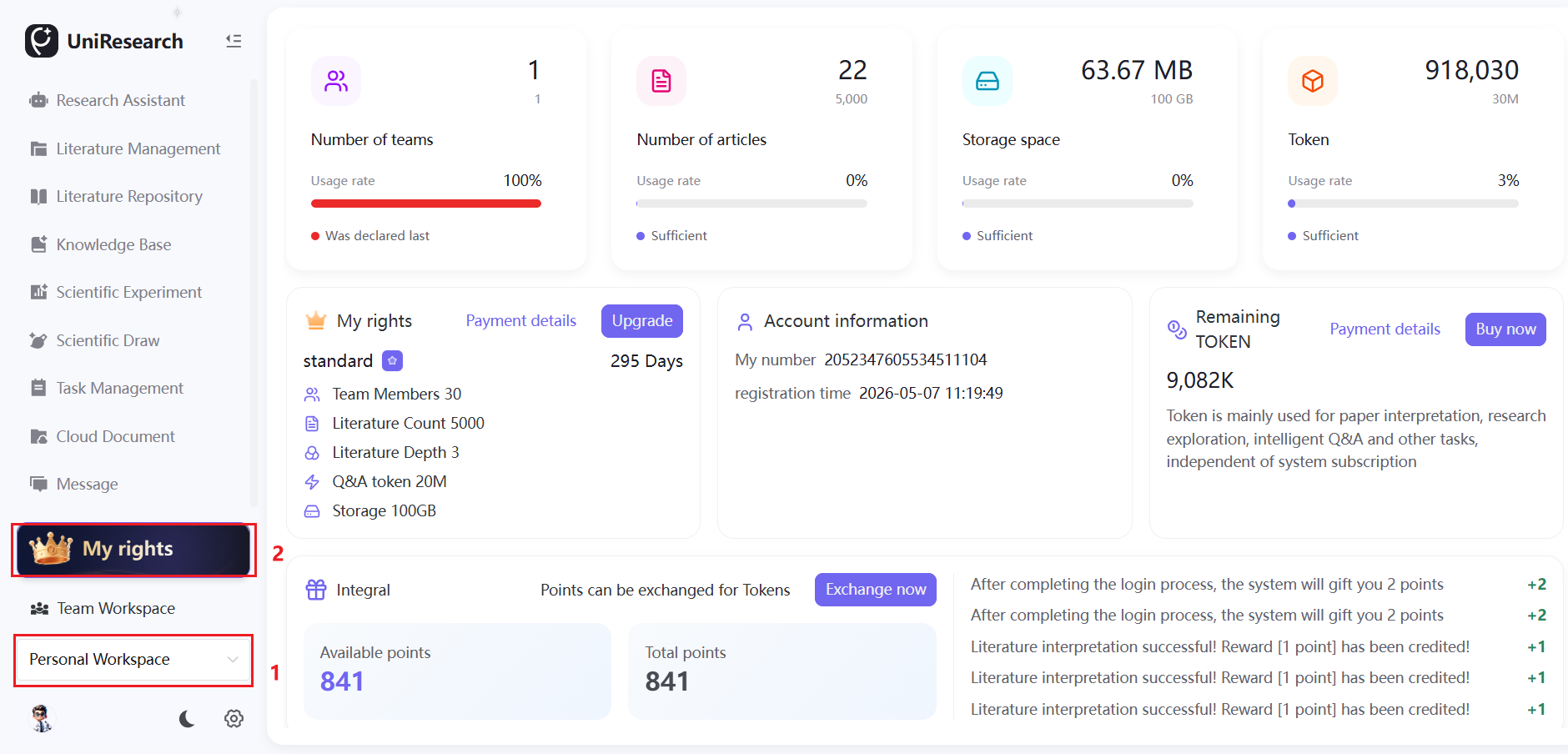
Resource Usage Statistics
Real-time display of your core resource usage. When a resource reaches its plan limit, the card turns red as a warning, and no new resources can be added — you need to clean up unused resources or upgrade your plan to expand capacity. Statistics include:
- Personal member count (Free plan includes only yourself)
- Literature used / plan limit
- Storage usage rate
- Remaining AI Tokens

Basic Benefits Information
Displays your active membership plan, resource quotas, and supports plan upgrades; shows your personal account ID and registration date; allows you to view and recharge AI Tokens, and query all payment order records with one click.

Points System
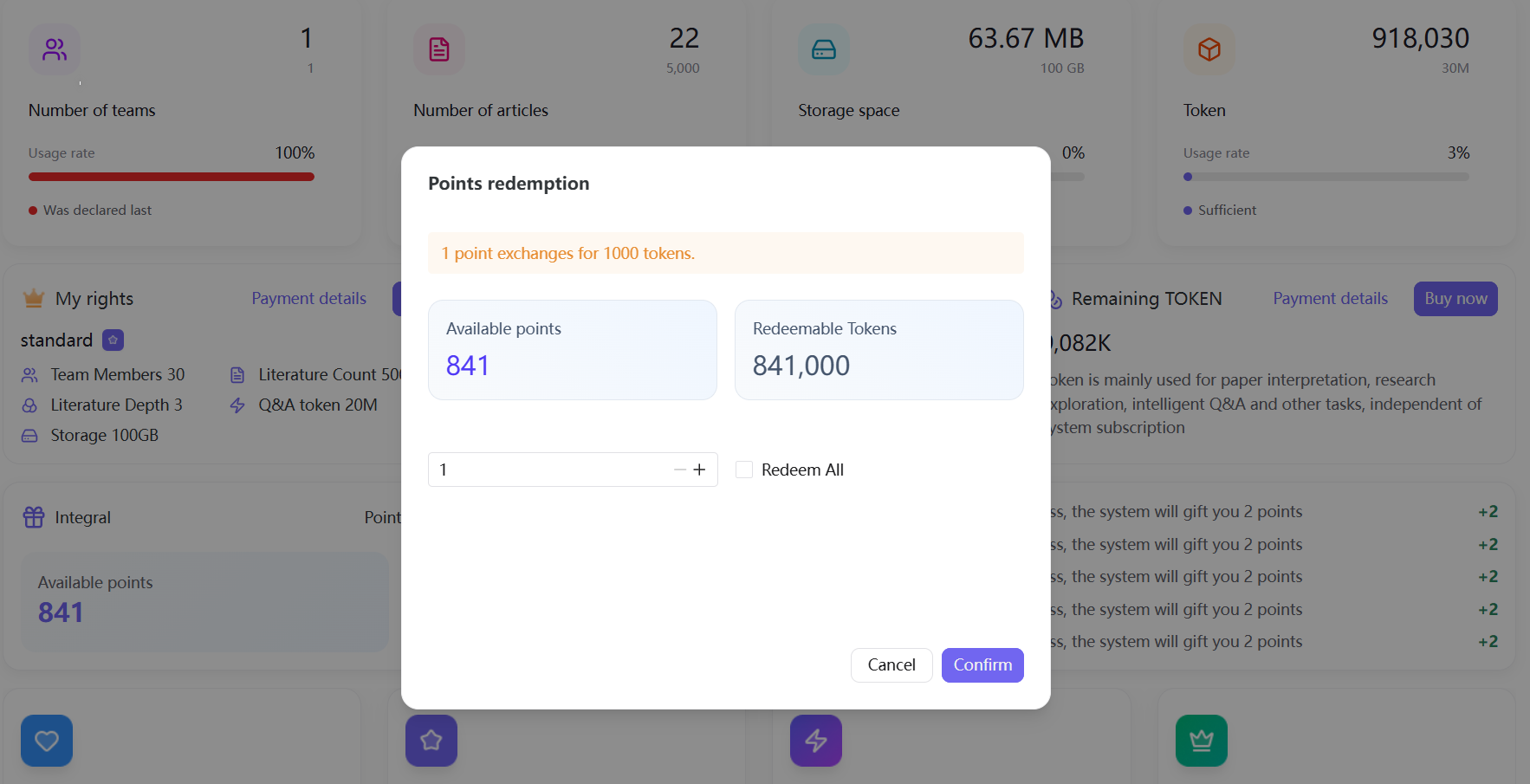
Points Rules: Points never expire and can be exchanged at a rate of 1 point = 1,000 Tokens for AI computing power. Points can only be exchanged for Tokens and cannot be applied toward membership fees. Points are permanently cleared upon account cancellation, and malicious point farming will result in suspension of point distribution.
Points Earning Details
| Category | Points | Notes |
|---|---|---|
| Login | 2 | Up to 10 times per day |
| Registration | 50 | First-time registration only |
| Literature Interpretation | 1 | Earned per interpretation |
| Research Exploration | 2 | Earned per exploration |
| Upload Literature | 1 | Earned per upload |
| Subscription | 100 | Earned by subscribing to a membership plan |
| Purchase Tokens | 20 | Earned by recharging computing power |
| Invite Member Registration | 20 | Earned by inviting new users to register |
| Invite to Team | 6 | Earned by inviting members to join a team |
| Share Literature/Knowledge Base | 10 | Earned by sharing resources |
Points Redemption Steps:
- Click "Redeem Now" in the Points section
- The system automatically calculates the total Tokens available for redemption
- Manually enter the redemption quantity or redeem all with one click
- After confirmation, points are deducted and Tokens are credited in real time
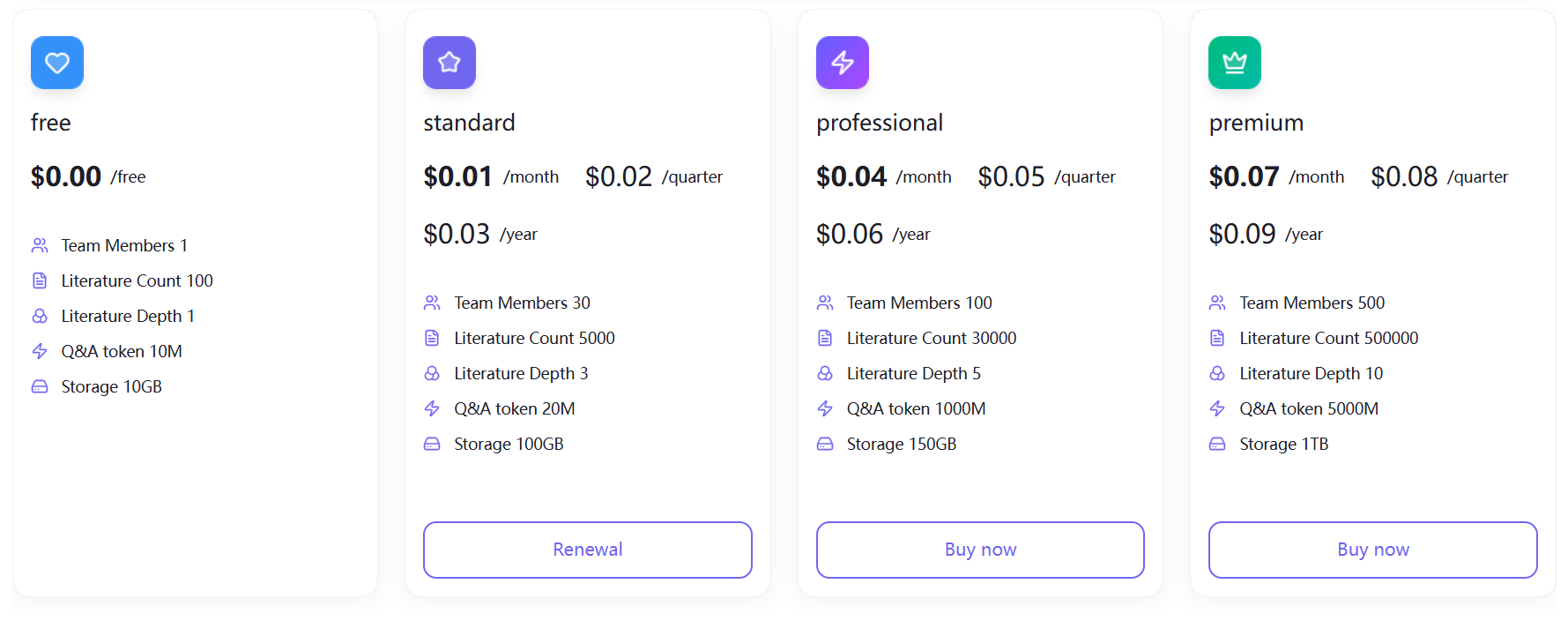
Plan & Token Recharge
The platform offers four membership tiers — Free, Standard, Professional, and Flagship — with monthly, quarterly, and annual subscription options. Higher-tier plans provide greater literature capacity, storage space, and AI computing quotas.
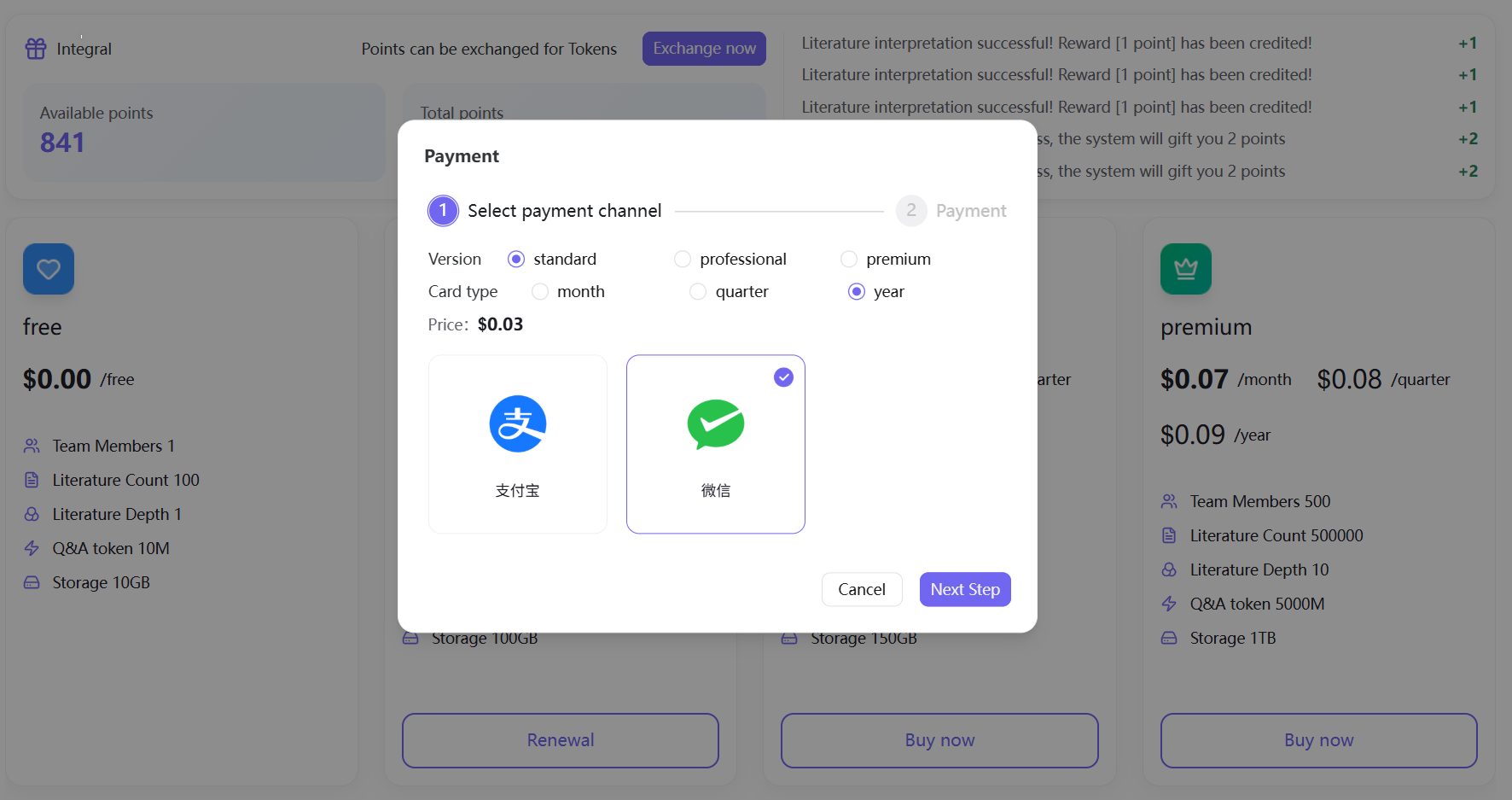
Plan Purchase Flow: Select plan tier and billing cycle → Confirm amount due → Choose WeChat Pay/Alipay → Complete payment, benefits take effect immediately.
Token Recharge Flow: Click "Buy Now" in the Token section → Select a recharge tier (100M Tokens, 220M Tokens, 350M Tokens, where M stands for million) → Complete payment → Computing power credited in real time.
Order Inquiry
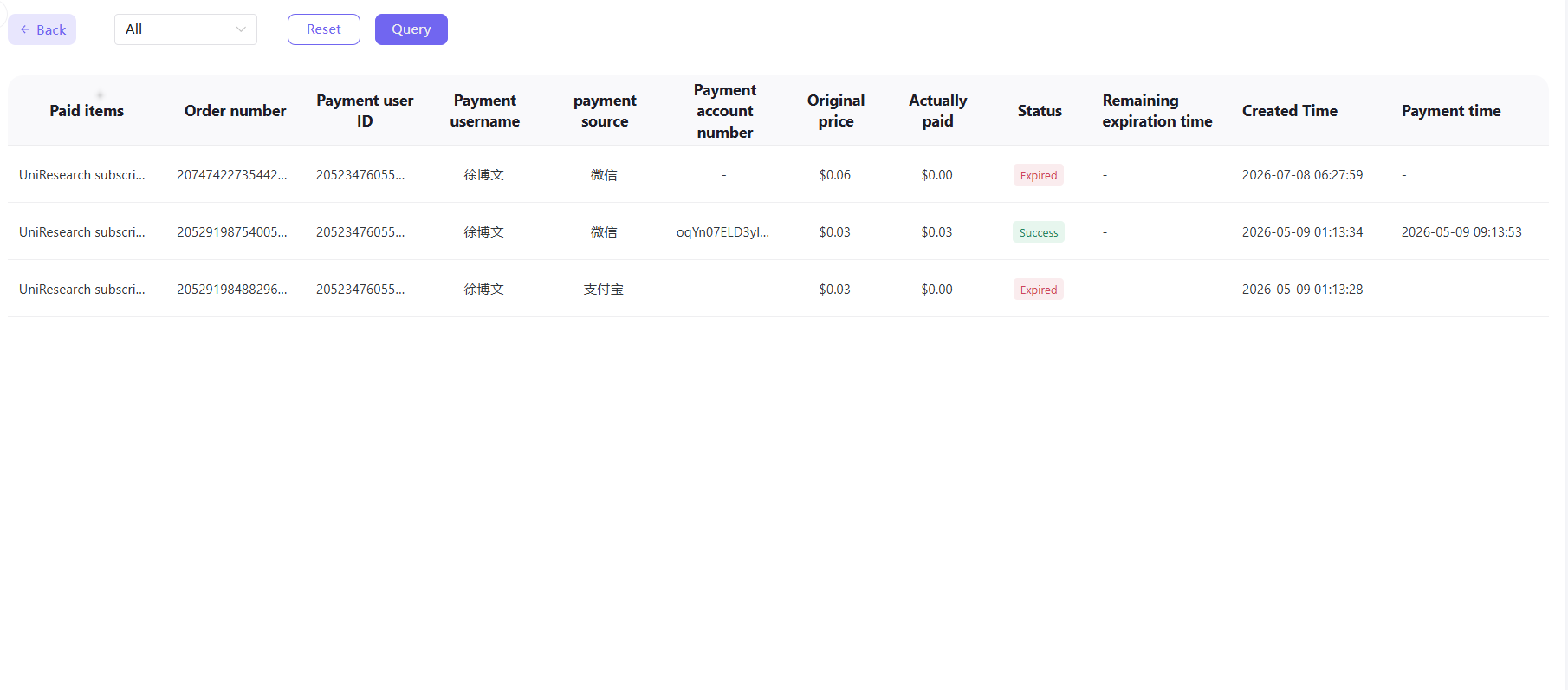
Access all subscription and recharge orders via the "Payment Details" entry. Filter by order type to view order number, payment channel, amount, order status, creation date, and other complete information. Orders are retained permanently.
Team Benefits (Team Space Exclusive)
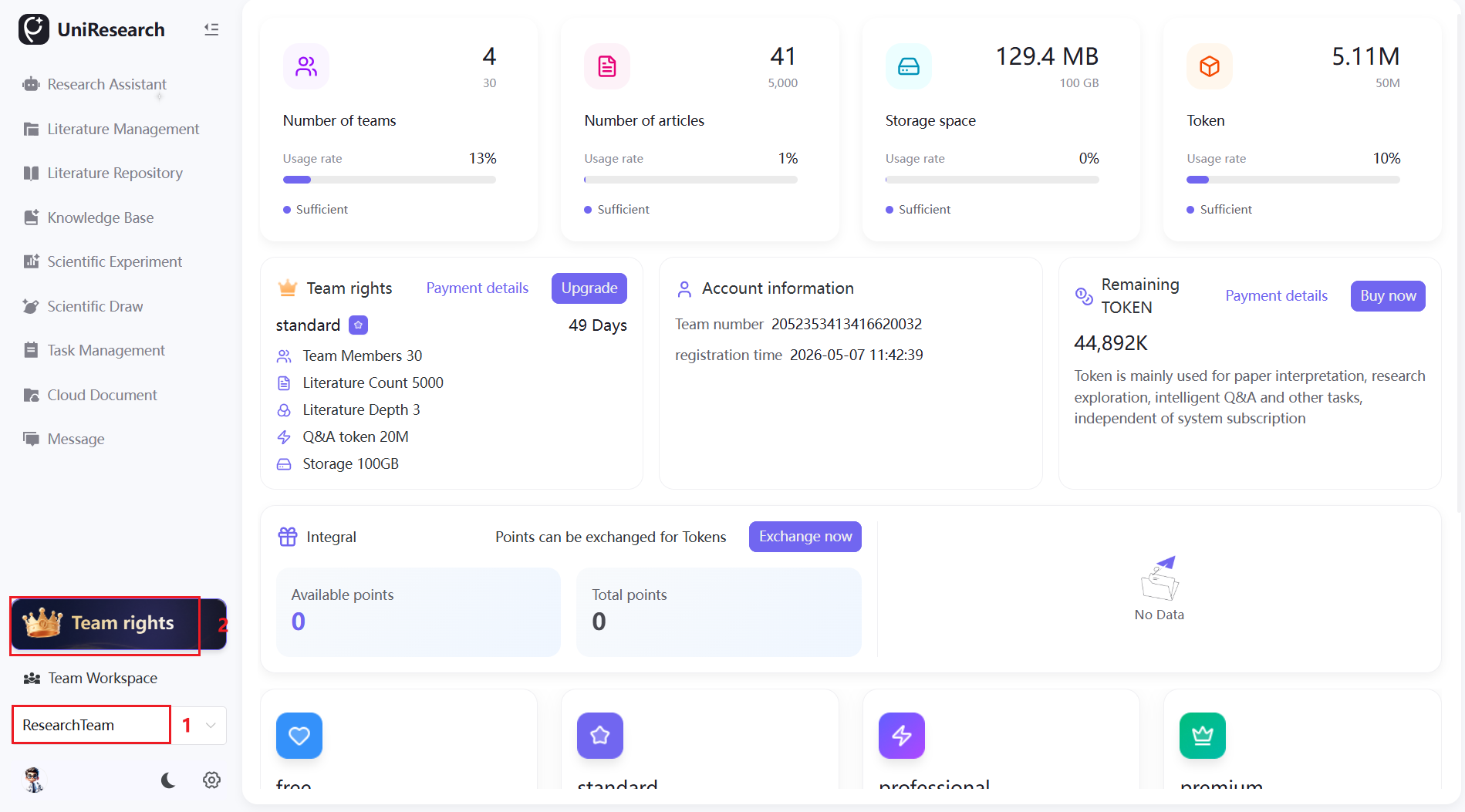
Key Note: Team Space does not have a points system and does not support point earning or point-to-Token redemption.
Resource Usage Statistics
Real-time display of total team members / plan limit, shared literature count / plan limit, storage usage rate, and shared team Token balance. When resources are fully utilized, all team members are unable to add new shared resources.
Plan & Computing Power Management
Displays the team's current plan tier and remaining validity period, supports plan renewal and upgrades to higher tiers; supports bulk team Token recharge, with computing power shared by all members after recharge; allows querying all team subscription and recharge order history.
Resource Limits & Expansion
When core resources reach their plan limits, the corresponding functions will be restricted:
| Resource Type | Impact at Limit | Resolution |
|---|---|---|
| Member Count | Unable to invite new members to the team | Upgrade plan to increase member limit, or remove existing members to free up slots |
| Literature Count | Unable to add new literature to Literature Management | Upgrade plan to increase literature limit, or delete unused literature to free up slots |
| Storage Space | Unable to upload literature to Literature Management or Knowledge Base, or add notes to literature | Upgrade plan to expand capacity, or clean up unused files to free up space |
| AI Tokens | Unable to initiate AI queries in Research Assistant, Scientific Drawing, Knowledge Base, and other modules | Recharge Tokens, redeem points, or upgrade plan to get more computing power |
Key Differences Between Individual and Team Benefits
| Comparison | Individual Benefits | Team Benefits |
|---|---|---|
| Points System | Supports point earning and redemption | No points functionality |
| Resource Isolation | Storage, Tokens, and literature quotas are independently calculated | Quotas are independently calculated and do not overlap |
| Activation Rule | Automatically activated upon registration | Must be manually created |
| Usage Restrictions | Quota limits affect only the individual | Quota limits affect all team members |